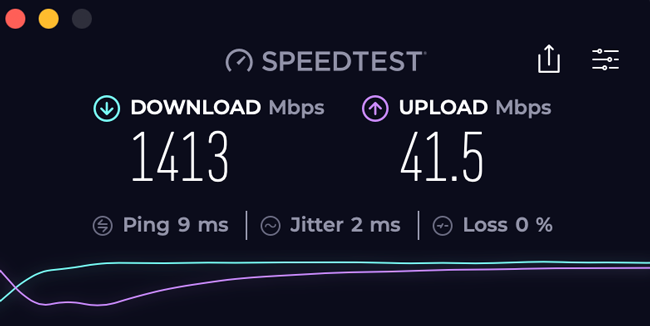
Midnight hits, the house goes quiet, and you decide to run a speed test just to see what kind of digital horsepower your hard-earned money is buying. The glowing dial spins, the digital needle spikes, and triumphant numbers flash across the screen: 942 Mbps down. You lean back, satisfied that your gigabit investment is delivering the goods. But by 7:30 PM the following evening, when the entire neighborhood is streaming live sports, gaming online, and pulling down massive software patches, that exact same test limps across the finish line at 310 Mbps.
Frustration sets in. You signed up for a 1,000 Mbps pipeline, so why does your home network frequently feel like it is stuck in the slow lane? The disconnect between what internet service providers advertise on flashy billboards and what your devices experience in the real world is one of the most persistent consumer grievances of the digital age. As we navigate through 2026, household bandwidth demands have never been higher, driven by ubiquitous 4K and 8K streaming, heavy cloud backups, and remote work infrastructure that treats packet loss like a mortal sin.
Understanding the mechanics of modern home internet requires looking past the glossy marketing brochures handed out by telecom giants. The term "gigabit" implies a firehose of data flowing directly into your living room without interruption. In practice, however, your connection is part of a massive, shared distribution ecosystem. From the physical infrastructure buried beneath your street to the aging Ethernet cable plugged into your desktop, every single link in the chain acts as a potential gatekeeper. If even one component fails to meet the technical requirements, your multi-dollar gigabit pipe gets bottlenecked down to a trickle.
The Anatomy of a Gigabit Connection and Why Advertised Speeds Mislead
The fundamental misunderstanding of gigabit internet begins with the definition of the product itself. When an ISP sells you a 1 Gbps (1,000 Mbps) plan, they are selling theoretical maximum capacity at the server level of their local distribution node, not a guaranteed throughput rate inside your home office. Network engineering involves overhead—protocol headers, framing data, and error correction bits that consume roughly 5 to 10 percent of any raw connection. Even under laboratory conditions with zero network congestion, a theoretical maximum download speed on a pure gigabit line rarely exceeds 940 to 950 Mbps.
Beyond protocol overhead, the architectural reality of how internet gets to your home dictates your performance ceiling. Traditional cable providers rely on hybrid fiber-coaxial (HFC) networks. While they can easily pump 1,000 Mbps down to your modem using DOCSIS 3.1 or DOCSIS 4.0 technology, their upload speeds often lag far behind, frequently capping out at 35 to 250 Mbps depending on the node configuration. Fiber-to-the-home (FTTH) providers, by contrast, offer symmetric speeds where your upload matches your download. Yet, even with fiber, shared local loops mean that your neighborhood shares a common pool of optical bandwidth, introducing variability during peak evening hours.
Price comparisons across the market reveal a striking reality about value per megabit. According to recent 2026 industry research, while entry-level plans have seen steady price creeping, gigabit fiber has established itself as the baseline standard for power users, often driving the effective cost-per-megabit down to historic lows. Consumers find themselves paying anywhere from $70 to $120 per month for gigabit tiers, depending on regional competition, equipment rental fees, and mandatory promotional phase-outs. When you pay a premium price for top-tier infrastructure, receiving only a fraction of that speed due to hidden bottlenecks feels like a bait-and-switch.
Uncovering the Hidden Bottlenecks Inside Your Walls and Wi-Fi Airwaves
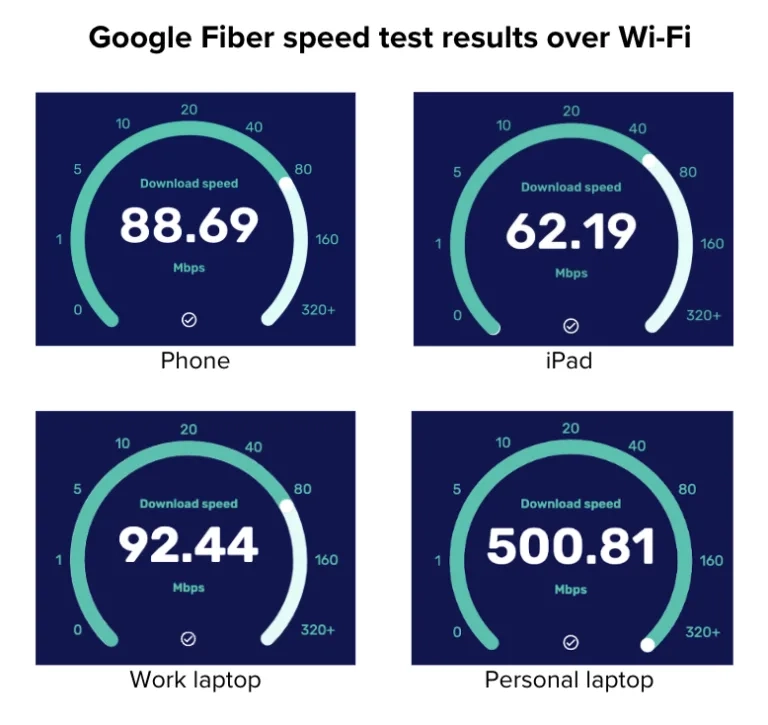
Once the data successfully crosses the threshold of your home via an Optical Network Terminal or a cable modem, it faces a gauntlet of internal hardware hurdles. The most common culprit behind substandard gigabit performance is not the ISP, but rather outdated wireless routing equipment. Wi-Fi 5 routers, and even early generations of Wi-Fi 6 hardware, struggle to push real-world wireless throughput past 500 to 600 Mbps under ideal conditions. Interference from neighboring networks, physical obstructions like concrete walls, and the distance between your device and the access point further degrade those wireless speeds into the low hundreds of megabits.
Wired connections are not immune to internal bottlenecks either. Many homeowners assume that because they plugged an Ethernet cable into their wall jack, they are instantly unleashing maximum speed. However, older CAT5 cables lack the internal shielding and twisted-pair construction required to reliably transmit gigabit data over long distances. If your house was wired a decade ago with CAT5 instead of CAT5e, CAT6, or CAT6a, your network interface card will automatically negotiate a fallback connection of 100 Mbps to maintain stability, effectively castrating your gigabit service without throwing an obvious error code.
Network congestion caused by smart home ecosystems also quietly eats away at available bandwidth. Modern households frequently maintain dozens of active client devices simultaneously—smart thermostats, security cameras uploading continuous high-definition footage to the cloud, voice assistants, mobile phones, and gaming consoles running background updates. While a single web page or streaming movie does not consume a full gigabit, the cumulative weight of twenty devices pulling data at once creates internal switch queuing delays. Your router’s processor and buffer memory bear the brunt of this traffic management, introducing microscopic latency spikes that make the connection feel sluggish.
A Practical Diagnostic Protocol to Measure True Network Performance
Diagnosing whether your internet service provider is delivering what you pay for requires a methodical, step-by-step approach that eliminates internal variables one by one. Relying on casual browser-based speed tests while sitting on the couch is useless for finding hardware faults. You need to isolate your connection directly at the source to generate reliable data that can be presented to customer support if a service dispute arises.
- Step 1 (Isolate the Source): Unplug your home router entirely from the ISP’s modem or optical network terminal to ensure zero internal network interference or device contention.
- Step 2 (Connect Directly): Take a certified CAT6a or CAT7 Ethernet cable and plug your laptop or desktop directly into port one of the modem or ONT. Ensure your computer’s network interface card is explicitly configured to gigabit full-duplex mode.
- Step 3 (Use Dedicated CLI Tools): Bypass browser-based testing tools that suffer from JavaScript rendering overhead and browser bottlenecks. Download and run the official command-line interface speed test utility provided by trusted testing authorities to measure raw throughput.
- Step 4 (Test at Varied Hours): Run your isolated tests at multiple times throughout the day—specifically during off-peak morning hours and peak evening congestion windows between 7 PM and 10 PM—to document any degradation patterns caused by ISP oversubscription.
- Step 5 (Log and Compare): Record your download speed, upload speed, and ping latency over a consecutive five-day period. If your baseline wired speed during off-peak hours consistently falls more than 20 percent below your subscribed tier, you have actionable evidence of an ISP-side delivery failure.
Navigating Common Pitfalls and Practitioner Workarounds in Home Networking
Even experienced tech enthusiasts often fall into predictable traps when attempting to optimize or troubleshoot high-speed home connections. Recognizing these missteps saves hours of wasted effort and prevents unnecessary hardware purchases. The following field-tested workarounds address the most frequent speed-robbing mistakes encountered in modern residential networks.
- Pitfall 1 (Trusting ISP-Supplied Wi-Fi Mesh Nodes): Relying solely on cheap, ISP-rented mesh extenders halves your wireless bandwidth with every single hop. Workaround: Hardwire your mesh nodes using Ethernet backhaul cables instead of relying on wireless repeating, preserving your multi-gigabit throughput across rooms.
- Pitfall 2 (Ignoring Network Switch Limitations): Connecting a gigabit router to an unmanaged legacy 100 Mbps switch to expand port availability in an entertainment center. Workaround: Audit every physical switch in your home infrastructure to ensure every unmanaged or smart switch explicitly supports Gigabit Ethernet (1000BASE-T) or 2.5 GbE standards.
- Pitfall 3 (Failing to Update Router Firmware): Running factory-default firmware that contains unpatched packet-handling bugs and memory leaks. Workaround: Check for router firmware updates monthly, or transition to robust open-source routing firmware like OpenWrt or pfSense for advanced traffic shaping and hardware acceleration.
- Pitfall 4 (Overlooking Server-Side Limitations): Assuming every website, game server, or cloud storage provider is capable of uploading data to your computer at 1,000 Mbps. Workaround: Understand that external servers throttle individual connections to balance their own loads; use multi-connection download managers and peer-to-peer benchmarking to test true saturation limits.
- Pitfall 5 (Accepting Bufferbloat Under Load): Experiencing severe lag spikes in online games or voice calls the moment a family member starts downloading a large file. Workaround: Enable Quality of Service (QoS) or FQ-Codel active queue management settings inside your router to prioritize latency-sensitive packets over bulk downloads.
The Broader Economic and Technical Reality of Multi-Gigabit Consumer Tiers
As the telecommunications industry aggressively pushes 2 Gbps, 5 Gbps, and even 10 Gbps symmetrical fiber packages into suburban and urban markets, a larger philosophical question emerges regarding consumer value. For ninety percent of households, a true, stable 500 Mbps connection easily handles multiple simultaneous 4K streams, heavy cloud syncing, and competitive gaming without breaking a sweat. The push toward gigabit and multi-gigabit plans is frequently driven by marketing psychology rather than actual utilitarian necessity, though heavy data creators, remote video editors, and large families find legitimate use cases for massive upload bandwidth.
The economic model of selling these ultra-fast tiers relies on statistical multiplexing—the engineering principle that not every user on a neighborhood node will use their maximum bandwidth at the exact same moment. ISPs can safely sell 1 Gbps plans to fifty homes on a single shared optical line because the average utilization rate hovers below five percent during normal operational hours. When regional networks experience structural congestion, however, the infrastructure strain exposes the limits of this oversubscription model, resulting in the speed drops that frustrate consumers.
Looking ahead, the evolution of home networking standards like Wi-Fi 7 and 10-Gigabit Ethernet plumbing means that our internal hardware is finally catching up to the raw capacity of fiber distribution. Yet, this technological leap underscores the widening gap between raw speed capability and practical application. Simply paying an ISP more money each month does not automatically grant you a faster experience if your physical environment, client devices, and local routing architecture remain unoptimized. True digital performance is a holistic system where every single component must be tuned to match the speed of the incoming signal.
Strategic Recommendations for Maximizing Your Home Internet Investment
Getting full value out of a premium internet plan requires treating your home network like a piece of critical infrastructure rather than an appliance you set up once and forget. Implementing a proactive maintenance and upgrade schedule ensures that your hardware investments yield tangible performance gains rather than expensive disappointment.
Begin by auditing your physical wiring infrastructure. Replace any mystery Ethernet cables marked simply as "CAT5" with certified CAT6 or CAT6a cabling, particularly for runs connecting your main router to desktop computers, gaming rigs, and access points. If you live in a multi-story home or a sprawling single-story ranch, abandon the idea that a single central router can blanket every square foot with gigabit-tier Wi-Fi. Invest in a dedicated tri-band mesh system with wired Ethernet backhaul channels, or run dedicated wiring to strategically placed wireless access points.
Finally, establish a healthy skepticism toward advertised speeds and focus instead on latency stability and packet delivery. A connection that delivers a rock-solid 500 Mbps with a consistent 3 ms ping and zero packet loss will always feel faster, more responsive, and more reliable than a gigabit connection suffering from bufferbloat, jitter, and wild speed fluctuations. By taking control of your internal network environment, you bridge the gap between marketing promises and real-world performance, ensuring your internet setup truly delivers what you pay for.
The pursuit of the elusive gigabit speed test result is ultimately a journey into understanding how modern digital systems interact. We live in an era of astonishing technological capability where petabytes of information travel across continents in milliseconds, yet the final fifty feet inside our homes remains vulnerable to cheap cables, congested airwaves, and outdated hardware. Recognizing that your internet connection is a fragile chain composed of many distinct links changes how you approach troubleshooting and consumer advocacy.
As data demands continue to escalate alongside advancements in cloud computing, immersive media, and smart infrastructure, the importance of robust home networking will only intensify. Armed with a clear understanding of network overhead, internal hardware limitations, and diagnostic methodologies, you are no longer at the mercy of confusing ISP metrics or misleading marketing claims. Take charge of your digital environment, optimize your internal infrastructure, and demand the performance your household deserves.